
How to Fix Common Payload Release Issue?

When you’re out in the field and relying on precision drops, nothing is more frustrating than a release device that fails to work as expected. Whether you’re operating a drone for delivery, fishing, rescue, or inspection, tackling payload deployment issues and payload mechanism issues head-on will save you time, stress, and mission failures. This guide is written for U.S.-based field techs and will walk through key checks, what to look for, and how to fix common problems.

Focus on the Light-Sensor System (for external sensors)
For models such as the Drone Sky Hook used on drones like the DJI Mavic Pro/Platinum, Mavic 2 (all models), Mavic Air 1, Phantom 4 (all models) and Phantom 3 (all models), the Sky Hook systems use an external light sensor plugged into the “SENS” port on the Sky Hook device. If that sensor isn’t set up correctly or has dirt or small debris blocking the sensing hole, you’ll run into payload mechanism issues or payload deployment issues. Here’s your checklist:
a) Verify the plug is fully inserted into the SENS port
Ensure the sensor’s plug is seated snugly and is fully inserted in the SENS port on the Sky Hook unit. A loose connection can mean the device never senses the drone’s LED state, meaning the release may never trigger.

b) Ensure the sensor side covers the drone’s light (LED) as per the installation guide and that there is no dirt or small debris blocking the sensing hole
The external sensor must be aligned so that it sees the drone’s LED light exactly as the instructions describe. If the sensor eye is mis-positioned, or the sensor body does not seal properly the surrounding ambient sunlight, the system won’t detect the trigger event, and you’ll encounter payload deployment issues.

c) Route the cable exactly as per the installation guide, keeping it away from drone sensors and propellers
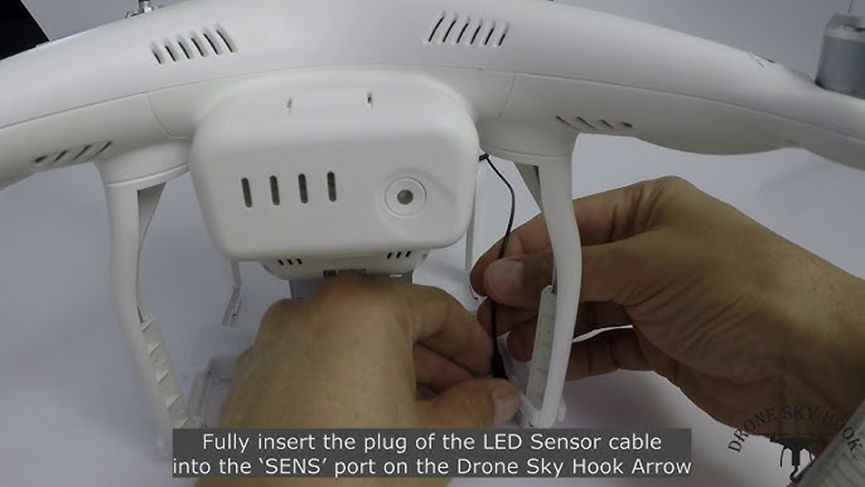
Cable routing is critical. If the sensor cable is too close to the drone’s onboard sensors (e.g., vision-positioning, obstacle avoidance) or the propellers, you might interfere with flight or trigger inaccuracies. Also, stray cable movement can cause false triggers or misalignment another source of payload mechanism issues.
By diligently following the above three checks, you eliminate one large category of failure causes before lifting off.
Check the Sensor’s Small Light Hole (for both built-in and external sensors)
Whether you’re using the external sensor or the built-in sensor version of the Sky Hook unit, you must inspect the sensor’s small light hole (the optical port). A blocked or occluded light hole can result in release failure and payload deployment issues.
Make sure that the small hole is free of sand, dust, debris, adhesive residue, or other blockages.
Clean it gently with compressed air or a soft brush.
After cleaning, power up the system and verify the sensor is reading the drone LED correctly by trying to trigger the Sky Hook device according to each drone operating manual.
If you skip this, you risk the sensor never detecting the LED trigger, so the release will never occur.


These simple optical checks are easy to neglect, especially in dirty or beach environments, but they often make the difference between a perfect drop and a failed mission.
Battery / Power-Up Verification
A surprising number of payload mechanism issues stem not from the release hook but from the device's power state. Always perform this quick check before mission take-off:
Power on the Sky Hook device. The PWR LED blinks fast for about 1 second during its quick initialization process.
After that, the PWR Green LED should blink in a pattern that shows the battery capacity.
If the PWR Green LED does not blink at all after initialization, that is a red flag. The device must be charged. It should not be used for any mission until it shows proper power indication.
Battery capacity:
4 Blinks – pause – 4 Blinks – pause… – Batt capacity: 90 - 100%
3 Blinks – pause – 3 Blinks – pause… – Batt capacity: 75 - 90%
2 Blinks – pause – 2 Blinks – pause… – Batt capacity: 50 - 75%
1 Blink – pause – 1 Blink – pause… – Batt capacity: 25 - 50%
OFF – Batt capacity: 0 - 25% (Critical level - requires charging)
A device with no visible battery-status blinking may have insufficient capacity to perform a safe release or may shut down during flight, resulting in payload deployment issues at exactly the wrong moment.
General Troubleshooting - Additional Common Issues
Beyond the light-sensor interface and power diagnostics, here are other common culprits and how to address them:
1. Payload weight and balance
Overloading the drone or release mechanism is a classic cause of failure. Although the sky hook system can carry more than the drone can safely carry, exceeding the recommended payload weights per each drone model, can stress the drone, cause erratic flight behavior, and will not allow for safe payload release.
Always weigh the total system: drone + Sky Hook device + payload.
Use a Drop Cord at least 6 feet (180 cm) long.
Do a hover test before the mission to verify stable lift.
2. Release hook or servo jam/stuck
Mechanical binding is often an unseen enemy: dust, corrosion, bent pins, debris lodged in the hook hinge, or even a slightly deformed part can block release.
Inspect the hook mechanism, look for wear or deformation.
Ensure the Drop Hook rotates freely when manually actuated (using the Sky Hook FUNC button).
If needed, replace the Drop Hook with a new one available from Drone Sky Hook for all drone models.
3. Firmware or software issues
Although less common on dedicated release mechanisms, always verify that the drone firmware is up to date. One user noted:
Connect to WiFi or tethered PC and check accessory updates.
Re-initialize the drone after any firmware change.
If required, re-bind C/Fn buttons to the correct option as described in the Sky Hook Operating Manual for each specific drone model.
4. Signal/trigger command failure
Drone Sky Hook systems offer Payload release via the drone’s remote controller C/Fn button and by YAW maneuver (drone rotation). If the signal chain is broken, you’ll see payload deployment issues.
Make sure the drone is in “Ready to Fly” mode (GPS locked, sensors active).
Test the Drop Hook trigger by C/Fn button and by YAW maneuver. Some drone models allow for on-the-ground testing and some requires the drone to be in the air.
Monitor remote-controller sticks/buttons for correct mapping and response.
5. Environment and mounting interference
Especially when deploying in challenging settings (windy coastlines, dusty fields, wet conditions), mounting and environmental factors cause havoc.
Ensure the release device is mounted per manufacturer guidelines (no interference with drone sensors, camera, propellers).
Inspect for looseness in the mount; vibrations may cause mis-reads or release drift.
Verify no other equipment is blocking the drone’s LED that the sensor uses.
Field Checklist - Before Every Mission
Use this checklist each time you prepare for a payload deployment mission to minimize payload deployment issues and payload mechanism issues:
Plug-in check: Confirm external light sensor plug fully inserted (for relevant models).
Sensor alignment check: Confirm sensor side covers the drone’s LED as per installation guide.
Cable routing: Ensure the sensor cable avoids drone VPS/obstacle sensors and propellers.
Optical port check: Clean the tiny light-hole on both external and built-in sensors, ensure no blockage.
Power init check: Power up device, observe fast PWR LED blink, then PWR LED capacity blink. If no blink, charge device.
Payload balance: Verify total weight, perform hover test.
Mechanical release check: Inspect Drop Hook for binding or damage, actuate manually using the Sky Hook FUNC button.
Firmware test: Confirm drone firmware current, test trigger command.
Mount check: Confirm mount secure, no sensor overlaps.
Final pre-flight drop test: With dummy payload, perform one test drop at low altitude in safe area.
Payload Release Issue takeaway…
Whether you’re carrying emergency supplies, bait for a fishing mission, or a small package for delivery, technical reliability comes down to attention to detail. Correcting the small things, like verifying the sensor plug, ensuring the cable is properly routed, cleaning a tiny sensor hole, and watching for the battery LED blink, can be the difference between mission success and failure.
By systematically applying the checks listed above, you’re significantly reducing the risk of payload deployment issues and payload mechanism issues before you ever launch. Keep your eye on the details, respect the system’s limits, and you'll fly with confidence.


.png)
Comments